5 Security Holes in CI/CD Pipelines I Keep Finding
Five recurring CI/CD security vulnerabilities from real pipeline audits: exposed secrets, overprivileged roles, unverified images, missing approval gates, and poisoned dependencies.
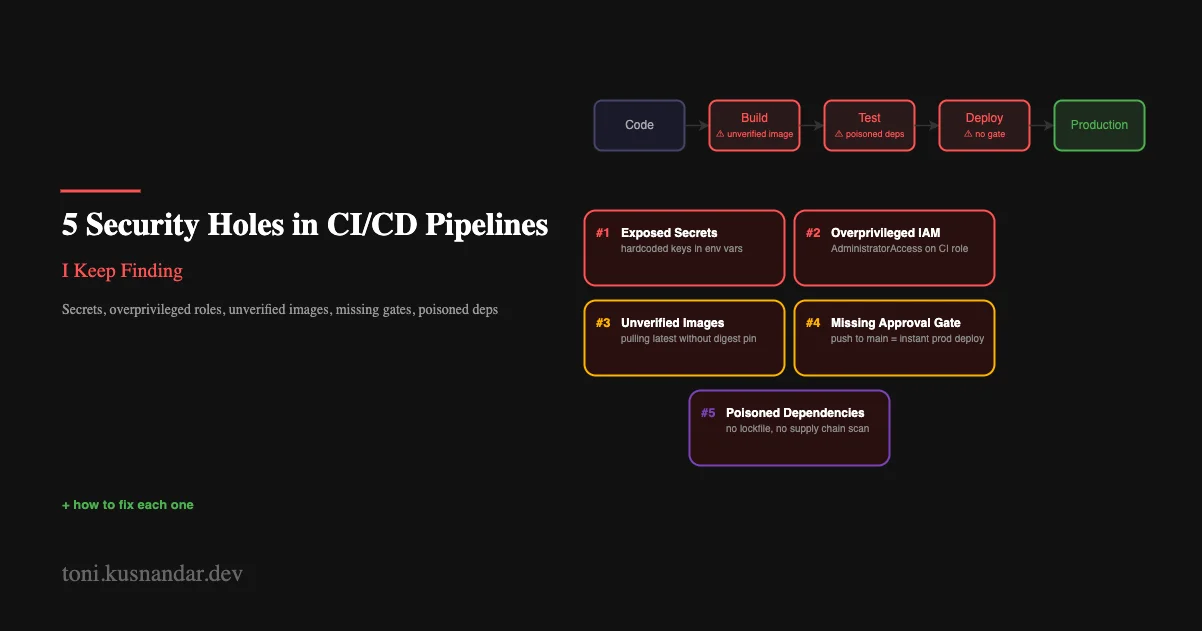
I set up and audit CI/CD pipelines as part of my DevOps support work. After reviewing dozens of codebases, the same five vulnerabilities appear over and over. Not exotic zero-days. Basic security hygiene that gets skipped because the pipeline “just works.”
Each one of these has caused a real incident somewhere. Some of them I discovered during audits before they caused problems. Others I heard about after the fact. All of them are fixable in a few hours once you know what to look for.
This article focuses on GitHub Actions pipelines deploying to AWS. The patterns apply to other CI systems, but the specific fixes use GitHub and AWS primitives.
Hole 1: Long-Lived AWS Credentials in Secrets
This is the most common. You set up GitHub Actions, follow a tutorial, and end up with AWS_ACCESS_KEY_ID and AWS_SECRET_ACCESS_KEY stored as repository secrets.
The problem: these credentials never expire. If your repository is compromised through a supply chain attack, a leaked secret, or a misconfigured access policy, an attacker gets permanent AWS access. They can exfiltrate data, spin up resources, or destroy infrastructure until you manually rotate the keys.
Rotating keys is also painful. You have to generate new credentials, update every secret in every repository, and hope nothing breaks.
The Fix: OIDC Federation
GitHub Actions supports OIDC. Instead of storing credentials, the workflow requests short-lived tokens from AWS STS. Tokens expire when the job completes.
Setup requires an IAM OIDC provider and a role with a trust policy:
resource "aws_iam_openid_connect_provider" "github" {
  url             = "https://token.actions.githubusercontent.com"
  client_id_list  = ["sts.amazonaws.com"]
  thumbprint_list = [
    "6938fd4d98bab03faadb97b34396831e3780aea1",
    "1c58a3a8518e8759bf075b76b750d4f2df264fcd"
  ]
}

resource "aws_iam_role" "github_actions_deploy" {
  name = "github-actions-deploy"

  assume_role_policy = jsonencode({
    Version = "2012-10-17"
    Statement = [{
      Effect    = "Allow"
      Principal = { Federated = aws_iam_openid_connect_provider.github.arn }
      Action    = "sts:AssumeRoleWithWebIdentity"
      Condition = {
        StringEquals = {
          "token.actions.githubusercontent.com:aud" = "sts.amazonaws.com"
        }
        StringLike = {
          # Restrict to specific repo and branch
          "token.actions.githubusercontent.com:sub" = "repo:your-org/your-repo:ref:refs/heads/main"
        }
      }
    }]
  })
}
In the workflow:
permissions:
  id-token: write
  contents: read

steps:
  - name: Configure AWS credentials
    uses: aws-actions/configure-aws-credentials@v4
    with:
      role-to-assume: arn:aws:iam::123456789012:role/github-actions-deploy
      aws-region: ap-southeast-1
No secrets. No rotation. No permanent credentials anywhere. If the workflow is abused, the token expires within minutes.
The StringLike condition on the subject claim is important. Without restricting it to a specific repository, any GitHub Actions workflow can assume your role. See my full CI/CD pipeline guide for a complete OIDC setup with Terraform.
Hole 2: Overprivileged Deploy Roles
Once OIDC is in place, the next problem is what that role can do. Most pipelines I audit have the deploy role attached to an AWS managed policy like PowerUserAccess or, worse, AdministratorAccess. This was probably added quickly “to make it work” and never tightened up.
An overprivileged deploy role means a compromised workflow can do anything in your AWS account. Create new IAM users, modify security groups, access unrelated databases, spin up expensive resources.
The Fix: Least-Privilege Role Policy
A deploy pipeline for ECS needs exactly these permissions:
resource "aws_iam_role_policy" "github_actions_deploy" {
  name = "deploy-policy"
  role = aws_iam_role.github_actions_deploy.id

  policy = jsonencode({
    Version = "2012-10-17"
    Statement = [
      # ECR: authenticate and push images
      {
        Effect = "Allow"
        Action = [
          "ecr:GetAuthorizationToken"
        ]
        Resource = "*"
      },
      {
        Effect = "Allow"
        Action = [
          "ecr:BatchCheckLayerAvailability",
          "ecr:GetDownloadUrlForLayer",
          "ecr:BatchGetImage",
          "ecr:InitiateLayerUpload",
          "ecr:UploadLayerPart",
          "ecr:CompleteLayerUpload",
          "ecr:PutImage"
        ]
        Resource = "arn:aws:ecr:ap-southeast-1:123456789012:repository/my-api"
      },
      # ECS: register task definitions and update services
      {
        Effect = "Allow"
        Action = [
          "ecs:RegisterTaskDefinition",
          "ecs:DescribeTaskDefinition",
          "ecs:UpdateService",
          "ecs:DescribeServices"
        ]
        Resource = "*"
      },
      # Required for ECS to use the task execution role
      {
        Effect = "Allow"
        Action = "iam:PassRole"
        Resource = [
          "arn:aws:iam::123456789012:role/ecsTaskExecutionRole",
          "arn:aws:iam::123456789012:role/my-api-task-role"
        ]
      }
    ]
  })
}
The ECR push permission is scoped to a specific repository ARN, not *. IAM PassRole is scoped to specific roles, not all roles. If an attacker compromises this role, their blast radius is limited to pushing images and deploying to ECS. They cannot touch RDS, S3, IAM, or any other service.
Use AWS IAM Access Analyzer to verify your policy. It will show you which actions were actually used versus what is permitted, making it easy to trim unnecessary permissions.
Hole 3: Pulling Images by Mutable Tag
Most pipelines build an image, tag it latest, push it, then reference it in the task definition as 123456789012.dkr.ecr.ap-southeast-1.amazonaws.com/my-api:latest.
The problem: latest is mutable. Between when you push and when ECS pulls, the tag can point to a different image. This happens through:
- Another pipeline run overwriting the tag
- A manual push from a developer machine
- A dependency or base image update that triggers a rebuild
More subtly: if your ECR repository is ever compromised or if there is a supply chain attack, an attacker can push a malicious image that gets deployed on your next ECS task replacement.
The Fix: Immutable Tags and Digest References
First, make ECR tags immutable:
resource "aws_ecr_repository" "api" {
  name                 = "my-api"
  image_tag_mutability = "IMMUTABLE"

  image_scanning_configuration {
    scan_on_push = true
  }
}
Second, tag images with the Git commit SHA, not latest:
- name: Build and push image
  env:
    IMAGE_TAG: ${{ github.sha }}
  run: |
    docker build -t $ECR_REGISTRY/$ECR_REPOSITORY:$IMAGE_TAG .
    docker push $ECR_REGISTRY/$ECR_REPOSITORY:$IMAGE_TAG
    echo "image=$ECR_REGISTRY/$ECR_REPOSITORY:$IMAGE_TAG" >> $GITHUB_OUTPUT
Now every image is pinned to a specific commit. The task definition always references a specific, immutable tag. Rolling back means pointing to the previous commit SHA. You always know exactly what code is running.
Additionally, enable ECR image scanning. It uses Amazon Inspector to detect CVEs in your images on push. This will not prevent deployment automatically, but alerts you to vulnerabilities before they reach production.
Hole 4: No Approval Gate for Production Deployments
Pipelines that auto-deploy to production on every push to main are fast. They are also one bad merge away from a production incident.
Common scenario: a developer force-merges a PR during an incident response. The merge contains code that has not been tested against current production data. The pipeline deploys it automatically. The incident gets worse.
Or: a dependency update is merged via Dependabot without manual review. It contains a breaking change. The pipeline deploys it to production before anyone notices.
The Fix: GitHub Environments with Required Reviewers
GitHub Environments add an approval gate without changing your pipeline structure:
jobs:
  deploy-staging:
    environment: staging  # No approval required
    runs-on: ubuntu-latest
    steps:
      # ... deploy to staging

  deploy-production:
    needs: deploy-staging
    environment: production  # Required reviewers configured here
    runs-on: ubuntu-latest
    steps:
      # ... deploy to production
Configure the production environment in GitHub repository settings:
- Required reviewers: add 1-2 engineers who must approve before the job runs
- Deployment branches: restrict to
mainbranch only - Wait timer: optionally add a delay after staging deploy before production can proceed
The approval takes 2 minutes. It adds a human checkpoint where a reviewer can check: is staging healthy? Are there any open incidents? Is this a good time to deploy?
This also provides a deployment audit trail. GitHub records who approved each production deployment, which is valuable for compliance and post-incident review.
Hole 5: Unpinned Third-Party Actions
Most GitHub Actions workflows use third-party actions like actions/checkout, aws-actions/configure-aws-credentials, or community actions. These are typically referenced by version tag:
- uses: actions/checkout@v4
- uses: aws-actions/configure-aws-credentials@v4
Version tags are mutable. The action maintainer can push new code to the v4 tag at any time. Your workflow pulls the latest code on every run. If an action is compromised through a maintainer account takeover, your pipeline will execute malicious code with full access to your secrets and AWS credentials.
This is not theoretical. Several major GitHub Actions have been compromised through maintainer account takeovers or supply chain attacks.
The Fix: Pin Actions to Commit SHA
# Pin to a specific commit SHA, not a mutable tag
- uses: actions/checkout@11bd71901bbe5b1630ceea73d27597364c9af683  # v4.2.2
- uses: aws-actions/configure-aws-credentials@e3dd6a429d7300a6a4c196c26e071d42e0343502  # v4.0.2
The commit SHA is immutable. The action code cannot change without a new SHA. When the action maintainer releases a new version, you deliberately update the SHA after reviewing the changes.
Find the correct SHA for any action by checking the releases page on GitHub. Pin to the latest stable release SHA.
For internal actions written by your own organization, version tags are fine since you control the code. For any third-party action, always pin to SHA.
Automate SHA updates with Dependabot:
# .github/dependabot.yml
version: 2
updates:
  - package-ecosystem: "github-actions"
    directory: "/"
    schedule:
      interval: "weekly"
    groups:
      actions:
        patterns:
          - "*"
Dependabot submits PRs to update pinned SHAs when new versions are released. You review and merge. You get the security of SHA pinning without manually tracking every action update.
Putting It All Together
Here is a checklist for auditing an existing pipeline:
- Remove
AWS_ACCESS_KEY_IDandAWS_SECRET_ACCESS_KEYfrom repository secrets - Set up OIDC with subject claim restricted to specific repo and branch
- Audit deploy role permissions, remove anything beyond ECR push and ECS deploy
- Enable ECR image tag immutability
- Replace
latestimage tags with commit SHA tags - Add a
productionGitHub Environment with required reviewers - Pin all third-party actions to commit SHAs
- Enable Dependabot for GitHub Actions updates
None of these take more than a few hours individually. The OIDC migration is the most involved because it requires Terraform changes, but even that is under a day of work.
Your CI/CD pipeline has the keys to your production environment. Treating it with less security rigor than your application code is a mistake that shows up eventually.
For a complete pipeline implementation that incorporates these patterns from the start, see my CI/CD with GitHub Actions and ECS guide. The Terraform for the full OIDC setup and least-privilege IAM role is covered there in detail.
If you want a security audit of your existing pipeline, I offer DevOps support that includes pipeline security review, IAM policy analysis, and implementation of fixes. Previous security reviews for client projects are documented in my DevOps portfolio.