Terraform Lessons from 40+ Production Projects
Hard-won Terraform lessons covering module strategy, state management, environment separation, secrets handling, drift detection, and anti-patterns from real client codebases.
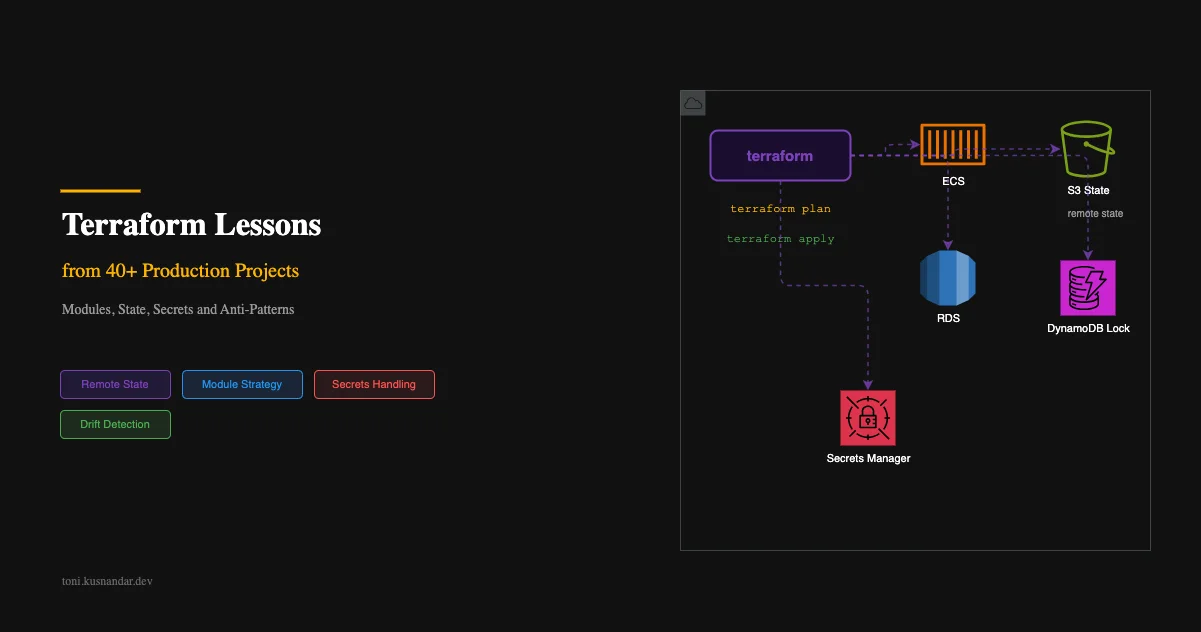
I have managed Terraform codebases for startups, agencies, and enterprise clients. Greenfield projects, legacy migrations, multi-account setups. The mistakes repeat. The same anti-patterns show up in every new codebase I audit.
These are not lessons from documentation. These are lessons from production incidents, panicked Slack messages at midnight, and hours spent untangling state files. If you are using Terraform in production or planning to, this will save you pain.
This article assumes you know Terraform basics. If you are setting up infrastructure as part of a DevOps practice for a small team, start there for context.
Lesson 1: Module Everything, But Not Too Early
The most common Terraform mistake I see from experienced developers: creating modules from day one.
The problem with premature modularization:
- Modules add indirection. Reading terraform code means jumping between files and directories.
- Module interfaces need design. Input variables, output values, version constraints.
- Changes require updating module source and all callers.
- For a single environment, modules add complexity without benefit.
When to extract a module:
- You have 2+ environments that share the exact same resource pattern
- A group of resources is deployed together and has a clear boundary
- You are sharing infrastructure patterns across teams or repositories
When NOT to modularize:
- You have only one environment
- The resources are only used in one place
- You are still iterating on the infrastructure design
My approach: Start flat, extract later
# Week 1: Everything in flat files
terraform/
├── main.tf
├── vpc.tf
├── ecs.tf
├── rds.tf
├── variables.tf
└── outputs.tf

# Month 3: Patterns stabilized, extract shared modules
terraform/
├── modules/
│   ├── ecs-service/
│   │   ├── main.tf
│   │   ├── variables.tf
│   │   └── outputs.tf
│   └── rds-instance/
│       ├── main.tf
│       ├── variables.tf
│       └── outputs.tf
├── environments/
│   ├── staging/
│   │   ├── main.tf
│   │   └── terraform.tfvars
│   └── production/
│       ├── main.tf
│       └── terraform.tfvars
The flat structure is easier to understand, faster to iterate on, and perfectly fine for a single environment. Extract modules when you actually need them, not because an article told you to.
Lesson 2: State Management with S3 + DynamoDB Locking
Your state file is the single source of truth about your infrastructure. Lose it, and Terraform has no idea what resources exist. Corrupt it, and you risk destroying production resources.
Non-negotiable state configuration:
terraform {
  backend "s3" {
    bucket         = "mycompany-terraform-state"
    key            = "production/api/terraform.tfstate"
    region         = "ap-southeast-1"
    encrypt        = true
    dynamodb_table = "terraform-locks"
  }
}
State bucket setup:
resource "aws_s3_bucket" "state" {
  bucket = "mycompany-terraform-state"
}

resource "aws_s3_bucket_versioning" "state" {
  bucket = aws_s3_bucket.state.id
  versioning_configuration {
    status = "Enabled"  # CRITICAL: allows state recovery
  }
}

resource "aws_s3_bucket_server_side_encryption_configuration" "state" {
  bucket = aws_s3_bucket.state.id
  rule {
    apply_server_side_encryption_by_default {
      sse_algorithm = "aws:kms"
    }
  }
}

resource "aws_dynamodb_table" "locks" {
  name         = "terraform-locks"
  billing_mode = "PAY_PER_REQUEST"
  hash_key     = "LockID"

  attribute {
    name = "LockID"
    type = "S"
  }
}
Why versioning matters: I have seen a team accidentally terraform destroy their production database. With versioned state, they recovered the previous state file and Terraform knew the database still existed. Without versioning, they would have needed to import every resource manually.
Why locking matters: Two engineers running terraform apply simultaneously can corrupt state. DynamoDB locking ensures only one operation runs at a time.
Lesson 3: Environment Separation
I have used both workspaces and directories. Directories win every time.
Workspaces vs Directories
| Aspect | Workspaces | Directories |
|---|---|---|
| State isolation | Same backend, different key | Completely separate |
| Accidental cross-env | Easy (forget to switch) | Impossible (different folder) |
| Different providers | Not possible | Yes |
| Different Terraform versions | Not possible | Yes |
| Variable separation | Conditional logic | Separate tfvars files |
| CI/CD complexity | Need workspace switching | Simple path targeting |
My directory structure:
terraform/
├── modules/             # Shared modules
│   └── ecs-service/
├── environments/
│   ├── staging/
│   │   ├── main.tf          # Module calls with staging config
│   │   ├── terraform.tfvars # Staging-specific values
│   │   └── backend.tf       # Staging state location
│   └── production/
│       ├── main.tf          # Same modules, production config
│       ├── terraform.tfvars # Production values
│       └── backend.tf       # Production state location
Each environment is completely independent. Different state files, different backends if needed, different provider versions. You cannot accidentally apply staging changes to production because you are in a different directory with a different state.
Lesson 4: Secrets Management with SSM Parameter Store
The most common security mistake in Terraform codebases: secrets in terraform.tfvars or .env files committed to Git.
The correct approach:
# Create the parameter (one-time, or via CLI)
resource "aws_ssm_parameter" "db_password" {
  name  = "/myapp/production/database/password"
  type  = "SecureString"
  value = "CHANGE_ME"  # Set real value via CLI, not in code

  lifecycle {
    ignore_changes = [value]  # Don't overwrite manual changes
  }
}

# Reference in your application config
resource "aws_ecs_task_definition" "api" {
  container_definitions = jsonencode([{
    secrets = [
      {
        name      = "DATABASE_PASSWORD"
        valueFrom = aws_ssm_parameter.db_password.arn
      }
    ]
  }])
}
Set secrets via CLI, never in code:
aws ssm put-parameter \
  --name "/myapp/production/database/password" \
  --type "SecureString" \
  --value "actual-secret-value" \
  --overwrite
The ignore_changes lifecycle block means Terraform creates the parameter but never reads or overwrites its value. The actual secret lives only in SSM and is injected into containers at runtime.
Lesson 5: Drift Detection and Reconciliation
Infrastructure drift happens when someone makes manual changes via the AWS console. This creates discrepancy between your Terraform state and reality.
Detecting Drift
Run terraform plan regularly (daily in CI):
# .github/workflows/drift-check.yml
name: Terraform Drift Check
on:
  schedule:
    - cron: '0 8 * * 1-5'  # Weekdays at 8 AM

jobs:
  drift:
    runs-on: ubuntu-latest
    steps:
      - uses: actions/checkout@v4
      - uses: hashicorp/setup-terraform@v3
      - run: terraform init
      - run: terraform plan -detailed-exitcode
        # Exit code 2 = changes detected (drift)
If terraform plan shows unexpected changes, someone modified infrastructure outside Terraform.
Reconciling Drift
Two options:
Option 1: Import the manual change into state
terraform import aws_security_group_rule.manual_rule sg-12345/ingress/tcp/443/443/0.0.0.0/0Option 2: Overwrite with terraform apply If the manual change was unauthorized, apply to revert to the desired state.
Preventing Drift
- Lock down console access. Use read-only IAM policies for most engineers. Only Terraform (via CI) gets write access.
- Tag resources. Add
managed_by = "terraform"tags to all resources. Anyone seeing this tag knows not to modify manually. - Education. Make sure the team understands that manual console changes create drift that breaks automation.
Lesson 6: Code Review for Infrastructure Changes
Terraform changes deserve the same review rigor as application code. Actually more, because mistakes affect production infrastructure.
My PR workflow:
- Developer creates PR with Terraform changes
- CI runs
terraform planand posts output as PR comment - Reviewer reads the plan output (not just the HCL diff)
- Review focuses on: what is being destroyed? What is being modified in place? Any unexpected changes?
- After approval, CI runs
terraform apply
What reviewers should look for:
- Destroys: Is anything being destroyed and recreated? This causes downtime.
- Force-new: Does a change trigger resource replacement? (e.g., changing RDS instance class)
- Security group changes: Are any ports being opened to 0.0.0.0/0?
- IAM changes: Are permissions being broadened?
- State operations: Are any
movedblocks or imports happening?
Lesson 7: Blast Radius Control
One state file per logical boundary. If a bad apply corrupts state or destroys resources, the damage is contained.
Split strategy:
terraform/
├── network/        # VPC, subnets, NAT (changes rarely)
│   └── terraform.tfstate
├── data/           # RDS, ElastiCache (critical, changes rarely)
│   └── terraform.tfstate
├── compute/        # ECS services (changes frequently)
│   └── terraform.tfstate
└── monitoring/     # CloudWatch, alerts (changes occasionally)
    └── terraform.tfstate
Why this matters: If your compute deploy goes wrong, your database and network are in a completely separate state file. They cannot be affected. The blast radius of any single terraform apply is limited to its boundary.
Cross-state references use remote state data sources:
# In compute/main.tf, reference network state
data "terraform_remote_state" "network" {
  backend = "s3"
  config = {
    bucket = "mycompany-terraform-state"
    key    = "production/network/terraform.tfstate"
    region = "ap-southeast-1"
  }
}

resource "aws_ecs_service" "api" {
  network_configuration {
    subnets = data.terraform_remote_state.network.outputs.private_subnet_ids
  }
}
Lesson 8: When NOT to Use Terraform
Terraform is not always the answer. I actively avoid it for:
Rapidly iterating resources. If you are creating and destroying Lambda functions daily during development, use the AWS CLI or CDK instead. Terraform’s plan/apply cycle is too slow for rapid iteration.
One-off resources. A single S3 bucket for a one-time data migration does not need Terraform. Create it manually, use it, delete it.
Resources managed by other tools. If your Kubernetes deployments are managed by Helm or ArgoCD, do not also manage them with Terraform. Pick one tool per resource.
Complex application configuration. ECS task definitions with 100+ environment variables are painful in HCL. Consider generating the task definition JSON and importing it.
Anti-Patterns from Real Client Codebases
These are actual patterns I have found and fixed:
1. The God Module: One module that creates VPC + ECS + RDS + S3 + CloudFront + everything. 2000 lines, 50 input variables, impossible to test or reuse.
2. Hardcoded account IDs everywhere:
# BAD
resource "aws_iam_role" "app" {
  assume_role_policy = jsonencode({
    Statement = [{
      Principal = { Service = "ecs-tasks.amazonaws.com" }
      # Account ID hardcoded in 47 places
    }]
  })
}

# GOOD
data "aws_caller_identity" "current" {}
# Use data.aws_caller_identity.current.account_id
3. No lifecycle blocks on critical resources:
# DANGEROUS: accidental change to engine_version destroys the database
resource "aws_rds_instance" "main" {
  engine_version = "16.2"
}

# SAFE: prevent accidental destruction
resource "aws_rds_instance" "main" {
  engine_version = "16.2"

  lifecycle {
    prevent_destroy = true
  }
}
4. Using count when for_each is appropriate:
# BAD: removing item from middle of list recreates subsequent resources
variable "services" {
  default = ["api", "worker", "scheduler"]
}
resource "aws_ecs_service" "svc" {
  count = length(var.services)
  name  = var.services[count.index]
}

# GOOD: stable identity per resource
resource "aws_ecs_service" "svc" {
  for_each = toset(var.services)
  name     = each.value
}
My Current Project Structure Template
After 40+ projects, this is what I start with:
terraform/
├── modules/
│   ├── ecs-service/          # Reusable ECS service pattern
│   └── rds-postgres/         # Reusable RDS pattern
├── environments/
│   ├── staging/
│   │   ├── main.tf
│   │   ├── variables.tf
│   │   ├── outputs.tf
│   │   ├── terraform.tfvars
│   │   └── backend.tf
│   └── production/
│       ├── main.tf
│       ├── variables.tf
│       ├── outputs.tf
│       ├── terraform.tfvars
│       └── backend.tf
├── .terraform-version        # tfenv version pinning
├── .tflint.hcl              # Linting configuration
└── Makefile                  # Common commands
Makefile for common operations:
ENV ?= staging

init:
	cd environments/$(ENV) && terraform init

plan:
	cd environments/$(ENV) && terraform plan -out=tfplan

apply:
	cd environments/$(ENV) && terraform apply tfplan

destroy:
	cd environments/$(ENV) && terraform destroy

fmt:
	terraform fmt -recursive

lint:
	tflint --recursive
This template works for projects from 1 service to 20+ services. It scales by adding modules and splitting state boundaries, not by restructuring.
If you need help setting up or cleaning up your Terraform codebase, I offer DevOps support where we audit your infrastructure code, implement best practices, and set up CI/CD for safe infrastructure deployments. Drawing from my experience in AWS architecture design and real-world production systems.
Examples of these patterns applied in real infrastructure: insurance platform DevOps and environment setup for media applications.